Check my plans, free

Sample package · open it before you pay

Sample construction takeoff — the workbook and the Quantity Model.

This is the package an order delivers, run on Maple Street Community Hall: a 3,200 SF single-story hall on a 16-sheet set that we drew ourselves, so we can publish it. Open the takeoff workbook, see where every quantity was measured, and check it piece by piece in the Quantity Model.

SAMPLE Fictional building · illustrative prices invented for the demonstration · not a bid, not an estimate, not a price for anything.

Three real public bids, as delivered ↓ · Free takeoff on your next bid ↓

Where We Measured, sample: the hall's floor plan with every measured wall, room and fixture marked SAMPLE
  • 3,200 SFfictional community hall
  • 16drawing sheets in the set
  • 6trade tabs in the workbook
  • 157pieces placed in the Quantity Model

What is in the sample package

Every quantity, traced to its sheet.

The same files an order delivers, from one run of the demonstration job. Click a picture to see the page at full size.

The sample workbook's takeoff sheet: quantity, cost, markup and selling price column groups on every line

Quantity Takeoff Workbook (.xlsx)

The file every other one reads from. A takeoff tab per trade — structural, architectural, plumbing, electrical, HVAC and sitework — with what was measured, your cost, your markup and your selling price on every line, plus the dashboard, schedule of values, draft proposal, schedule, cash flow and drawing register.

Download the sample workbook
A sample calculation sheet: the dimensions behind each quantity, row by row

Backup and calculation sheets

How each quantity was reached: the dimensions behind every number, row by row, the sheet it was read from, and how the total links to its takeoff line. A line the drawings could not answer says SOURCE INSUFFICIENT rather than carrying a guess.

Workbook pages, printed (35 pages, PDF)
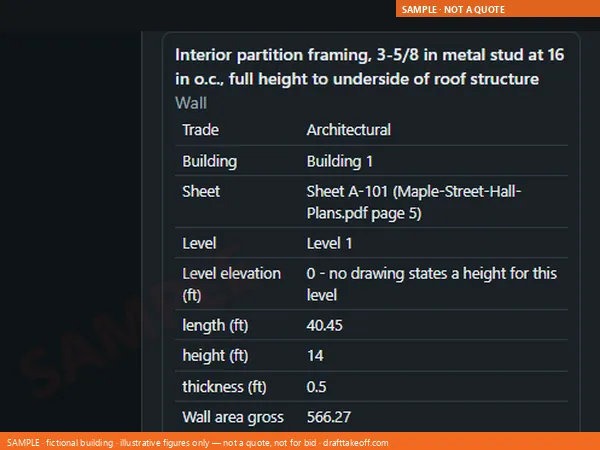
The sample Quantity Model: a tapped partition showing its length, height, openings and the sheet it was measured on

Quantity Model

A schematic model built from our own measurements. Pick a wall, a slab, a door or a run to see its quantity, the sheet it came from and its takeoff line. In the sample: 157 pieces placed from the drawings, 43 lines listed apart rather than guessed into place, and 8 questions pinned to the parts they concern - of the 29 questions for the designer in the workbook's RFI Register. One offline .html file, no login.

Schematic — for checking quantities only. Not a design model; not for dimensions.

Open the live Quantity Model ↗
The sample Confidence Report: every line graded, with the lines worth a second look listed

Confidence Report

Every line graded. The ones worth a second look are listed with the assumption and the question it raises, so your review time goes where the drawings were thin.

Read the takeoff in your browser ↗
The sample Pricing Studio: prices typed against locked quantities, with live totals

Pricing Studio and Project Overview

Type your own costs on the locked quantities and print a proposal, offline on your computer. The Project Overview scores the bid / no-bid decision from the same workbook.

Open the sample Pricing Studio ↗

Measured from the footings up

Eight real quantities from the sample hall.

Quantities, not prices — each one is a line in the sample workbook, with its calculation behind it.

LayerLineQuantity
Footings and slabPad footing F115 EA
Footings and slabSlab on grade, 5 in3,200 SF
Walls8 in CMU walls2,762 SF
WallsFace brick, net of openings726.67 SF
Roof structureSteel joists 24K715 EA
RoofMetal roof deck3,200 SF
RoofR-30 roof insulation3,200 SF
RoofTPO roof3,200 SF

The 4 in compacted granular base under the slab is a line of its own in the workbook, 39.51 CY. US units throughout: LF, SF, CY, EA.

Every sample file

Open it, in the order you would use it.

  • WHAT IS HELD BACK

    An extract, and every price is invented

    A few rows of each worked sheet, a three-line-a-trade Studio, and figures made up for a building that does not exist. The .xlsx opens in Excel but holds values only — no formulas, no rate sources — because a public file with live formulas would hand out our method for free. Your order gets the complete, live book, where a changed length carries through the quantity, the backup sheet and the proposal, with its rate cells blank or carrying published reference rates if you choose them before paying.

  • WHY THIS BUILDING

    The building is ours

    We drew it, so we can show it — a client's drawings are never published.

  • WHAT STILL SHOWS

    Gaps show

    Lines the drawings could not answer say SOURCE INSUFFICIENT, here too.

Real public bids, measured by DraftTakeoff

Three real projects, as they were delivered.

Three projects from public bid boards, run through the same order process a paying customer gets. Each package is the delivered workbook made read-only, with prices removed, and a one-page summary. The drawings stay with their owners: follow the link on each card to the bid page and compare.

What is in every delivered package

  • The live takeoff workbook: every line with its unit, its drawing sheet and its calculation.
  • Where We Measured pages: your drawings marked where each quantity came from.
  • Marked-up Plans with every quantity as a live markup. Each measured quantity is a live markup in Bluebeam Revu, with its line ID and figure in the Markups List, so you can check our takeoff in the software you already use and keep working from it. DraftTakeoff-Columns.xml and a Tool Chest file (.btx) come free. No Revu? The same quantities open in Excel and in any web browser.
  • The 3D Quantity Model, the Confidence Report and the list of questions for the designer.

Turnaround and checking

  • Delivered within 48 hours of payment clearing, weekends included, or within 24 hours with Rush.
  • Every package passes our automatic quality gate before it is sent; two of the three went through one repair round at that gate first.
  • Lines the drawings cannot answer say SOURCE INSUFFICIENT instead of a guess.

Free takeoff on your next bid

Try it on a bid you are pricing now.

We take a small number of free takeoffs each week for contractors who want to see the work on their own job: one bid per company, up to 30 drawing sheets, US projects, a bid date at least five business days away. In return we ask for five short answers about the package. For evaluation only — no liability for the bid outcome.

Up to 30. Requests are checked against the limits above. If yours is accepted, your personal order link arrives by email from orders@drafttakeoff.com — you upload the plans on the site, nothing is sent by email. This page shows a confirmation as soon as your request is in. No confirmation email is sent, and requests are read by hand, so there is no set reply time.

Your plans, measured the same way.

Drop your PDF set on the home page. Your browser counts the sheets and shows the fee in seconds — nothing is uploaded, nothing to sign up for.

Delivered within 48 hours of payment clearing, weekends included — the same package as this sample.